Steal What’s Working on 𝕏 (Twitter) in 2025

10 high-performing frameworks for each niche which go viral every time! 

How to Enable Adult Content on Bluesky

How to Enable Adult Content on Bluesky

Bluesky allows its users to share adult content on the platform, provided that clear consent is provided and abuse is not involved. 

However, you may not be able to view adult content on your Bluesky account just yet, especially if it’s new. 

You’ll probably be met with a label that says ‘Adult Content’
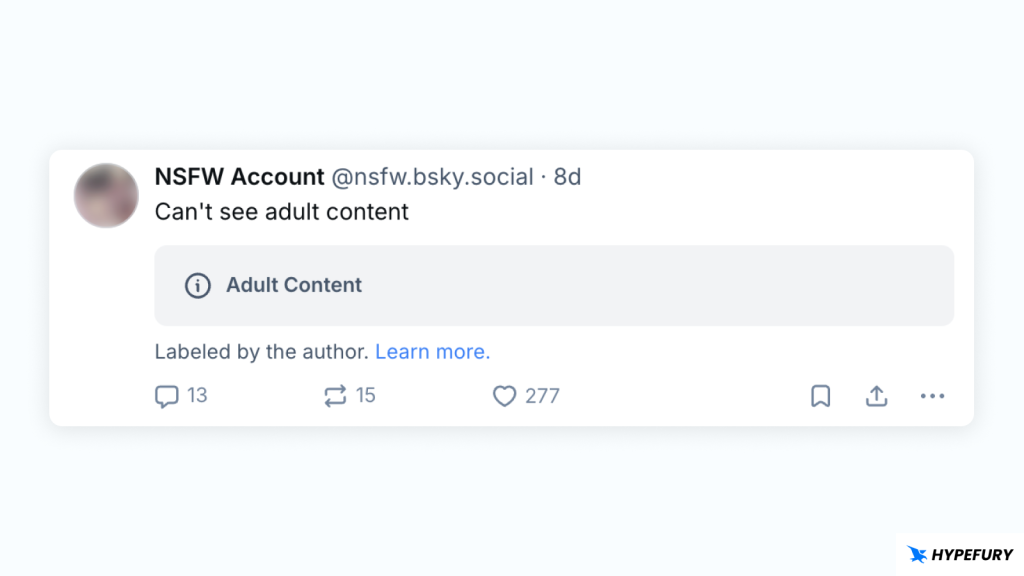
Bluesky adult content post label

This is because, by default, adult content is disabled, and you won’t be able to view adult content until you choose to enable adult content. 

Let’s take a look at how you can do it.

What is Sensitive Content on Bluesky?

Every social platform has “sensitive content” or “adult content” (also called NSFW).

Sensitive content is content that may include nudity, sexual themes or topics some users prefer to avoid.

On Bluesky, there is a way to control whether you see such content, below is a detailed guide.

How to Enable Adult Content on Bluesky

Here’s how you can see adult content on Bluesky:

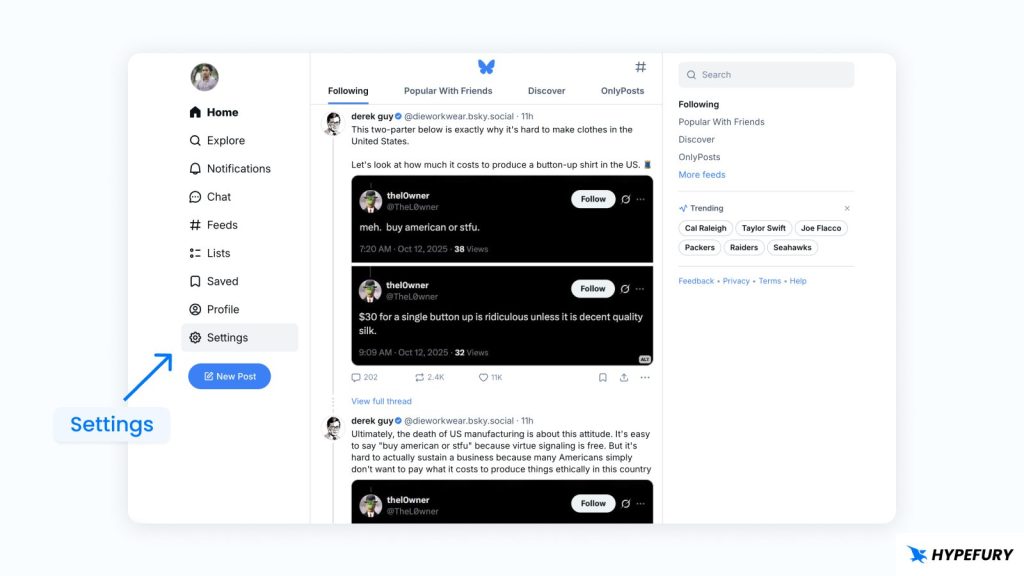
1 . Open Bluesky and go to Settings

Bluesky settings

2. On the settings page, click on Moderation
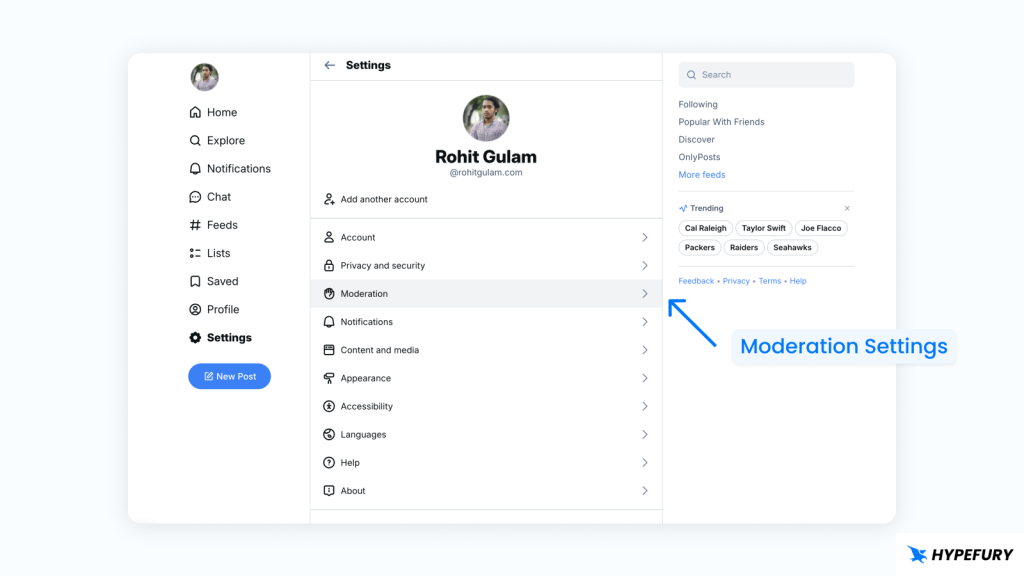
Bluesky moderation settings

3. Under Content Filters, you’ll see the Enable adult content option. Turn it on to enable adult content.
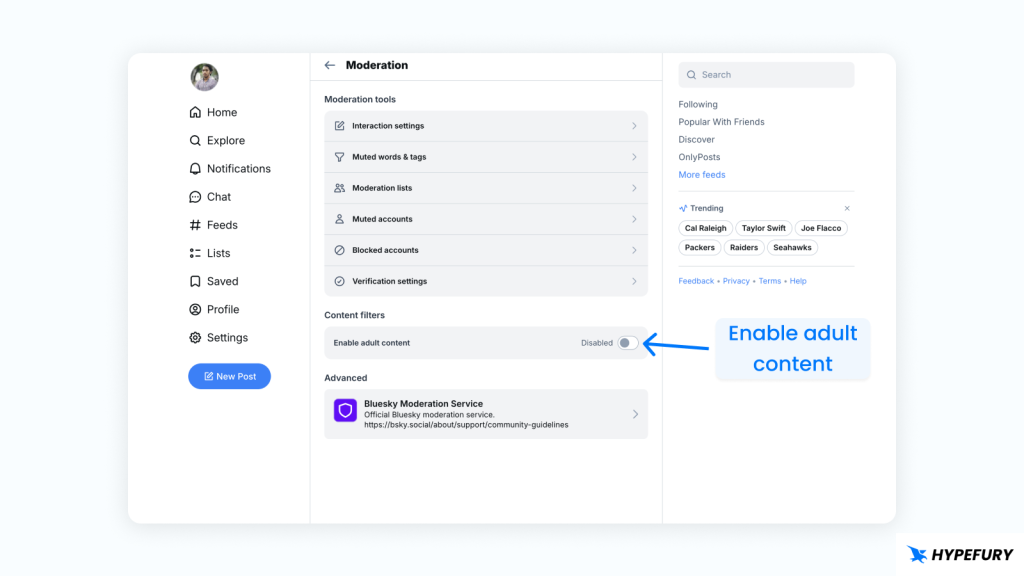
Enable adult content on Bluesky

When you’ve enabled adult content, further content filters will appear. Let’s take a look at what they mean.

Bluesky Adult Content Filters
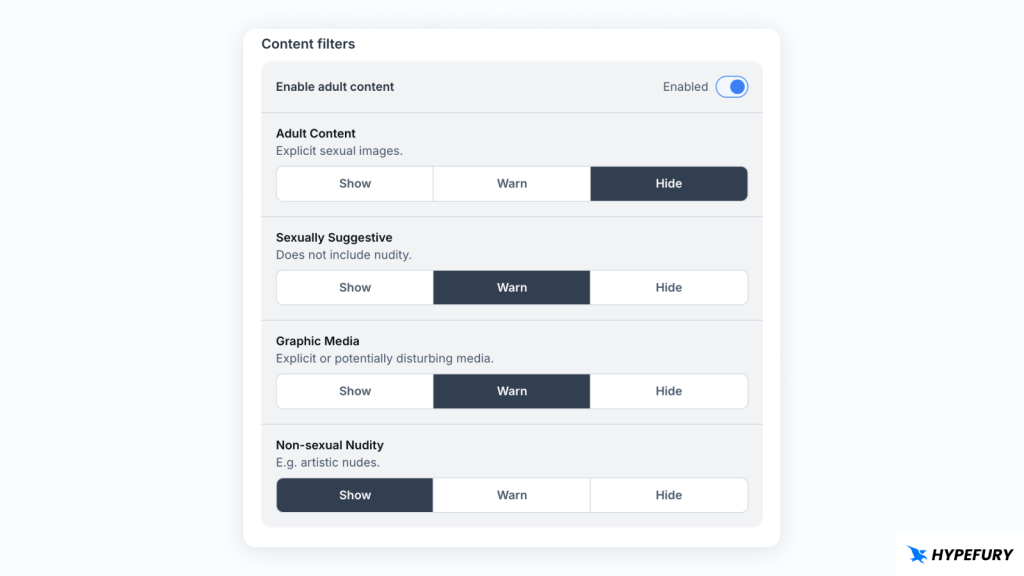
Bluesky Adult Content Filters

Within the adult content filter, we also have additional filters to enable more moderation for users, allowing them to filter exactly what they want to see. 

On all of these filters, you can choose one of the following options: 

  • Show — display all posts without warning.

  • Warn — display a warning or blur, allowing you to choose whether to reveal the content or not.

  • Hide — automatically block or filter out content from your feed.

On any filter, if it’s set to “Hide”, then you won’t see that content at all. So if you want to see that type of content, you should change to “Show” or “Warn.”

1. Adult Content

This contains explicitly sexual images or porn. 

This includes full nudity and sexual acts.

2. Sexually Suggestive

This includes content that implies sexuality but does not contain full explicit sexual acts or full nudity. 

This may include partial nudity or poses that are meant to be erotic.

3. Graphic Media

This contains visually disturbing content. Not necessarily sexual activity, but may mean violence, gore, or shocking content.

4. Non-sexual Nudity

This contains nudity content that is not meant to be sexual. 

For example, medical nudity, statues, and any other nude content that is not meant to be sexual.

What to Do If Adult Content is Still Not Being Displayed?

Many users report that changes made on mobile sometimes don’t work, so the workaround is:

  • Log out of Bluesky on mobile

  • Log in via the web / desktop version

  • Turn off adult content in the web settings

  • You can re-enable it by setting each category to “Warn”

  • Then log back in on mobile

Look for a “Show” link on posts
Once enabled, posts marked as adult content may show a “Show” or “Reveal” button.

How to Hide or Disable Adult Content on Bluesky

If you prefer not to see adult content, you can also take action:

  • In the same Moderation / Content Filters area, choose “Hide” so that posts labeled adult are filtered out.

  • Or choose “Warn” so that content is shown only after a warning.

  • If settings don’t seem to apply immediately on mobile, try adjusting them on the web/desktop version, then syncing back to your phone.

What to Do If Adult Content Settings Aren’t Working

Sometimes the settings don’t behave as expected, so here’s what to do;

  • Log out and back in.

  • Use the web / desktop interface to change the settings.

  • First disable the adult content filter, then re-enable it.

  • Set intermediate warning levels before jumping straight to “Show.”

  • Give it a minute; sometimes the change takes a little time.

Tips for Posting Sensitive Content Responsibly

  • Always use content warnings/labels when posting mature themes.

  • Accurately tag content (nudity, explicit language, etc.) so the system and users know what to expect.

  • If you schedule posts (via third-party tools), ensure labels are appropriately attached.

  • Be aware that “adult content” doesn’t override Bluesky’s rules; illegal or harmful content is never allowed.

Ready to Grow Your Audience
& Make Money on Social?

Hypefury makes it easy to create, publish and monetize your content across social media 

Join 3,500+ creators who are using Hypefury to earn online

Grow your audience on social media with Hypefury

Works with

Hypefury makes it easy to grow on on social media by proving you with the features that make it easy to create, distribute and monetize your content

Join 3,500+ creators who are using Hypefury to earn online

How to Enable Adult Content on Bluesky

How to Enable Adult Content on Bluesky

Bluesky allows its users to share adult content on the platform, provided that clear consent is provided and abuse is not involved. 

However, you may not be able to view adult content on your Bluesky account just yet, especially if it’s new. 

You’ll probably be met with a label that says ‘Adult Content’

Bluesky adult content post label

This is because, by default, adult content is disabled, and you won’t be able to view adult content until you choose to enable adult content. 

Let’s take a look at how you can do it.

What is Sensitive Content on Bluesky?

Every social platform has “sensitive content” or “adult content” (also called NSFW).

Sensitive content is content that may include nudity, sexual themes or topics some users prefer to avoid.

On Bluesky, there is a way to control whether you see such content, below is a detailed guide.

How to Enable Adult Content on Bluesky

Here’s how you can see adult content on Bluesky:

1 . Open Bluesky and go to Settings

Bluesky settings

2. On the settings page, click on Moderation

Bluesky moderation settings

3. Under Content Filters, you’ll see the Enable adult content option. Turn it on to enable adult content.

Enable adult content on Bluesky

When you’ve enabled adult content, further content filters will appear. Let’s take a look at what they mean.

Bluesky Adult Content Filters

Bluesky Adult Content Filters

Within the adult content filter, we also have additional filters to enable more moderation for users, allowing them to filter exactly what they want to see. 

On all of these filters, you can choose one of the following options: 

  • Show — display all posts without warning.

  • Warn — display a warning or blur, allowing you to choose whether to reveal the content or not.

  • Hide — automatically block or filter out content from your feed.

On any filter, if it’s set to “Hide”, then you won’t see that content at all. So if you want to see that type of content, you should change to “Show” or “Warn.”

1. Adult Content

This contains explicitly sexual images or porn. 

This includes full nudity and sexual acts.

2. Sexually Suggestive

This includes content that implies sexuality but does not contain full explicit sexual acts or full nudity. 

This may include partial nudity or poses that are meant to be erotic.

3. Graphic Media

This contains visually disturbing content. Not necessarily sexual activity, but may mean violence, gore, or shocking content.

4. Non-sexual Nudity

This contains nudity content that is not meant to be sexual. 

For example, medical nudity, statues, and any other nude content that is not meant to be sexual.

What to Do If Adult Content is Still Not Being Displayed?

Many users report that changes made on mobile sometimes don’t work, so the workaround is:

  • Log out of Bluesky on mobile

  • Log in via the web / desktop version

  • Turn off adult content in the web settings

  • You can re-enable it by setting each category to “Warn”

  • Then log back in on mobile

Look for a “Show” link on posts
Once enabled, posts marked as adult content may show a “Show” or “Reveal” button.

How to Hide or Disable Adult Content on Bluesky

If you prefer not to see adult content, you can also take action:

  • In the same Moderation / Content Filters area, choose “Hide” so that posts labeled adult are filtered out.

  • Or choose “Warn” so that content is shown only after a warning.

  • If settings don’t seem to apply immediately on mobile, try adjusting them on the web/desktop version, then syncing back to your phone.

What to Do If Adult Content Settings Aren’t Working

Sometimes the settings don’t behave as expected, so here’s what to do;

  • Log out and back in.

  • Use the web / desktop interface to change the settings.

  • First disable the adult content filter, then re-enable it.

  • Set intermediate warning levels before jumping straight to “Show.”

  • Give it a minute; sometimes the change takes a little time.

Tips for Posting Sensitive Content Responsibly

  • Always use content warnings/labels when posting mature themes.

  • Accurately tag content (nudity, explicit language, etc.) so the system and users know what to expect.

  • If you schedule posts (via third-party tools), ensure labels are appropriately attached.

  • Be aware that “adult content” doesn’t override Bluesky’s rules; illegal or harmful content is never allowed.

Ready to Grow Your Audience
& Make Money on Social?

Hypefury makes it easy to create, publish

and monetize your content across social media 

Join 3,500+ creators who are using HypeFury to earn online

You might also like

We won’t send you spam. Unsubscribe at any time