Steal What’s Working on 𝕏 (Twitter) in 2025

10 high-performing frameworks for each niche which go viral every time! 

Does Instagram Notify You When Someone Takes a Screenshot?

Does Instagram notify you when someone takes a screenshot

Does Instagram Notify When You Screenshot a Story?

No. Instagram does notify when you screenshot someone else’s story, nor does it notify you when someone screenshots your story.

Instagram used to have this feature a long time ago, where it would notify users when their stories were screenshot. However, that feature has long been gone, and Instagram no longer notifies about story screenshots.

That being said, there are some hacky ways that you can use to prevent people from screenshotting your stories, and it’s to prevent them from seeing them in the first place. We’ll take a look down below how to hide people from seeing your stories and posts.

Does Instagram Notify When You Screenshot a Post?

Just as with Instagram Stories, Instagram does not notify when someone screenshots a post.

Does Instagram Notify When You Screenshot a DM?

By default, Instagram does not notify when someone screenshots a DM, unless you’re using Instagram’s Vanish Mode – a feature that allows Instagram users to send each other DMs that disappear after they are read or after a certain time.

When using Vanish Mode, Instagram does notify when someone takes a screenshot or screen records. It’s a great tool for privacy protection if you want to discuss private, sensitive matters or gossip : ).
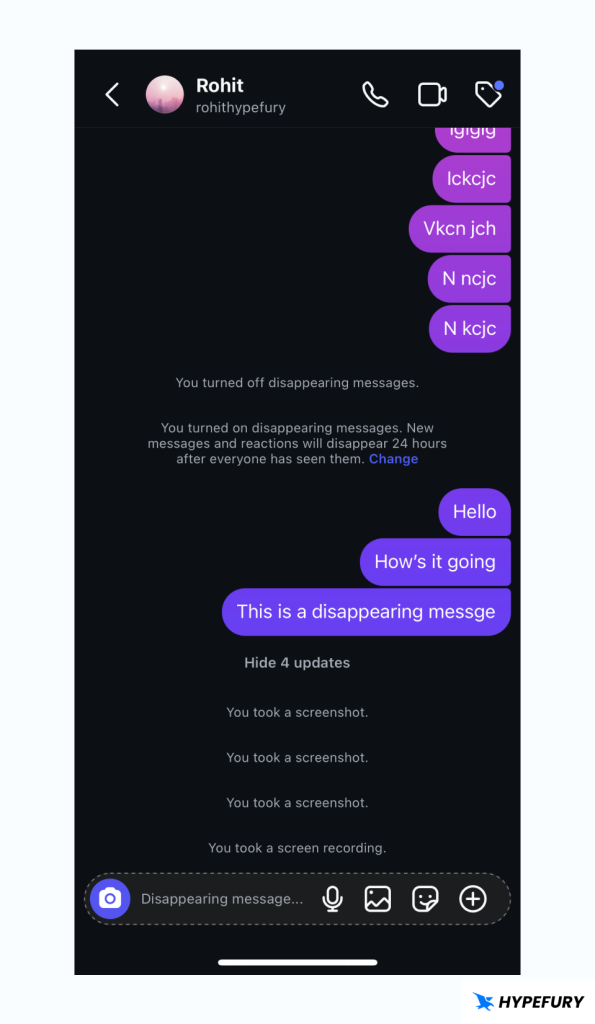
Instagram Vanish Mode

Why Do People Screenshot Instagram Stories, Posts or DMs?

People might screenshot stories, posts or DMs due to ethical or non-ethical reasons.

Here are some of the reasons why people save someone else’s contents;

  • Sharing information with friends outside Instagram.
  • Saving events that will happen and sharing them to other social media.
  • Keeping important announcements.

  • Saving a quote for later reference.
  • Getting ideas for future posts or projects.

How to Protect Your Stories and Posts from Screenshots

Protecting your stories or posts from not being seen by another user can be done through several ways, and among them are;

1. Use the Close Friends Feature

This allows you to share Stories only with selected people of your choice.

Making close friends is very easy and can be done with a few steps.

1. Visit your profile page.

2. Click the Settings button in the top right-hand side of your profile page, which is displayed as a hamburger icon (three lines).
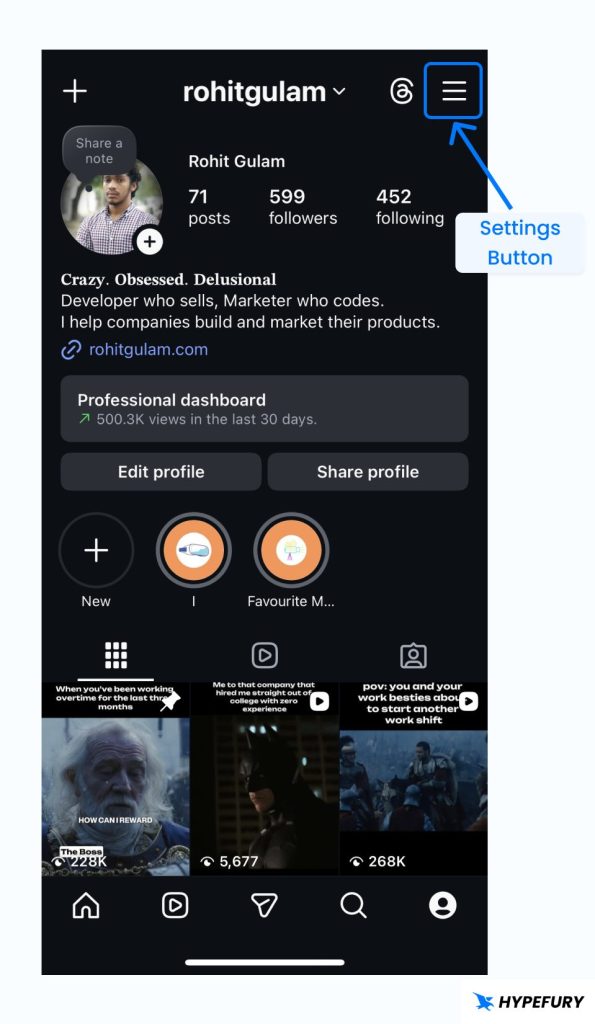
Instagram profile settings button

3.  Scroll down, under ‘Who can see your content’, choose Close friends.
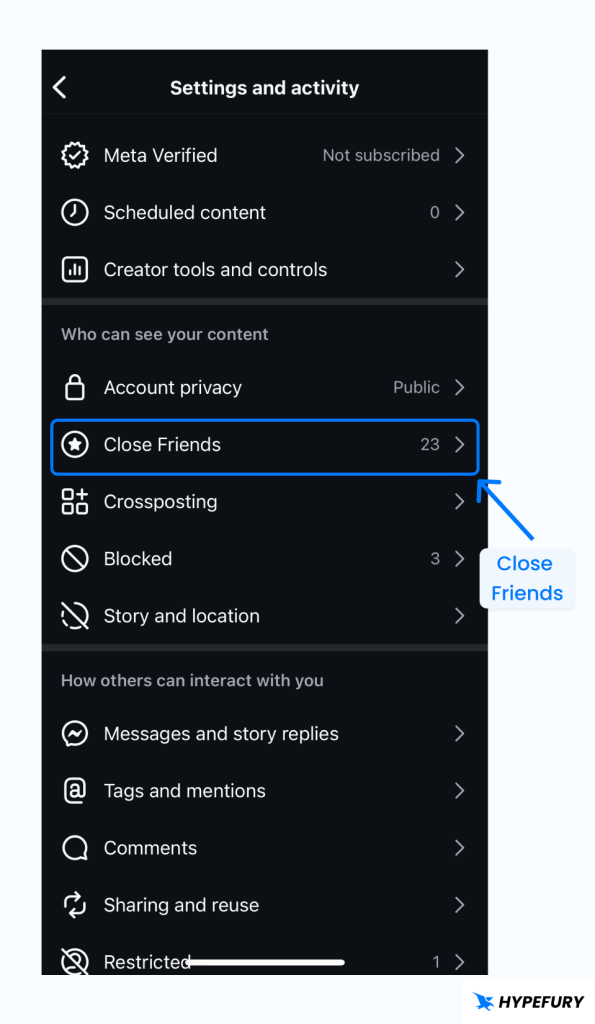
Instagram settings close friends

4. Select or search for the special friends you would like to be able to view your stories.
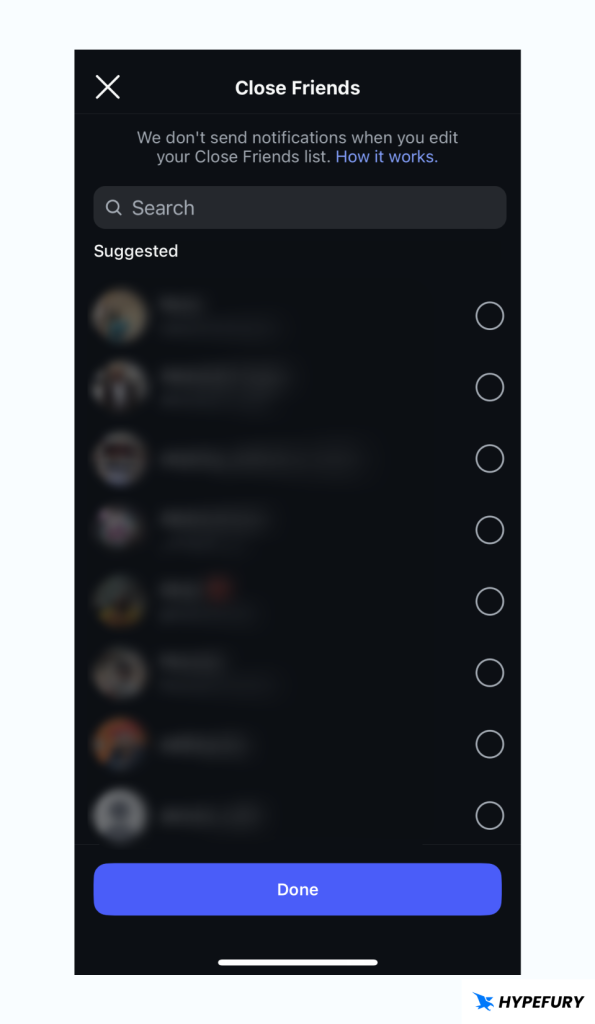
Instagram choose close friends

5. Once you’re done, just click Done.

2. Hide Your Stories from Specific Users

You can manually restrict who sees your Stories so that your Stories are only shown to the people you want.

Here is how you can hide your Instagram stories from specific users:

1. Visit your profile page

2. Click the Settings button in the top right-hand side of your profile page, which is displayed as a hamburger icon (three lines).

3. Scroll down until you see ‘Who can see your content’ and choose Story and location.
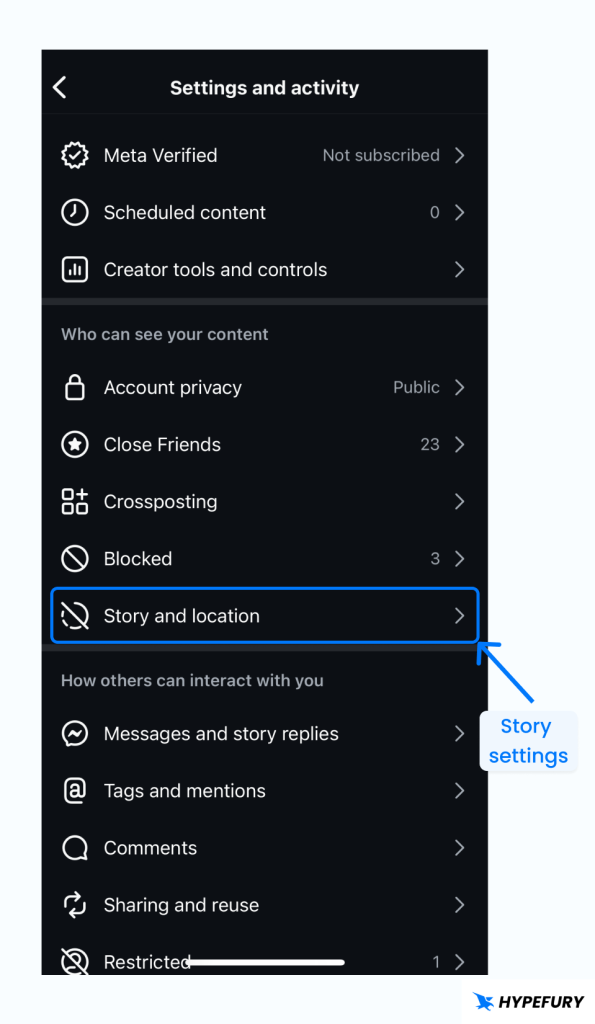
Story and Location Settings


4. Search and choose users you would like to hide your stories from.
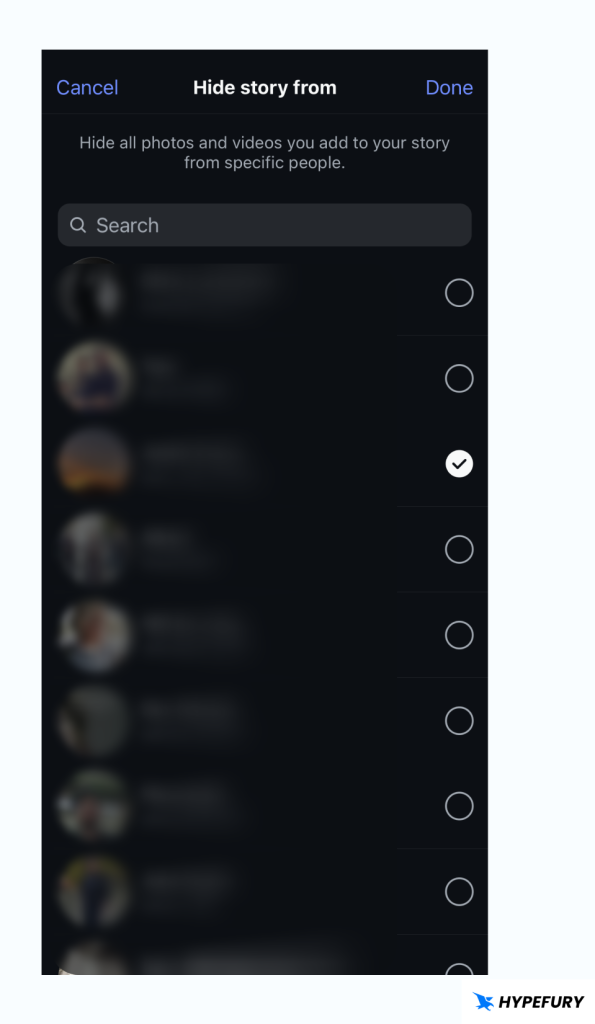
Hide users from Instagram story

5. Click Done on the top right to confirm the users you wish to hide your stories from.

3. Make Your Account Private

By making your account private, only users you allow to follow you will be able to view your posts and stories.

Keep in mind that users who already follow you know will be able to see your posts and stories

Here is how you can make your Instagram account private:

1. Open Instagram and visit your profile page

2. Click the Settings button in the top right-hand side of your profile page, which is displayed as a hamburger icon (three lines).

3. Scroll down until you see ‘Who can see your content’, and choose Account privacy.
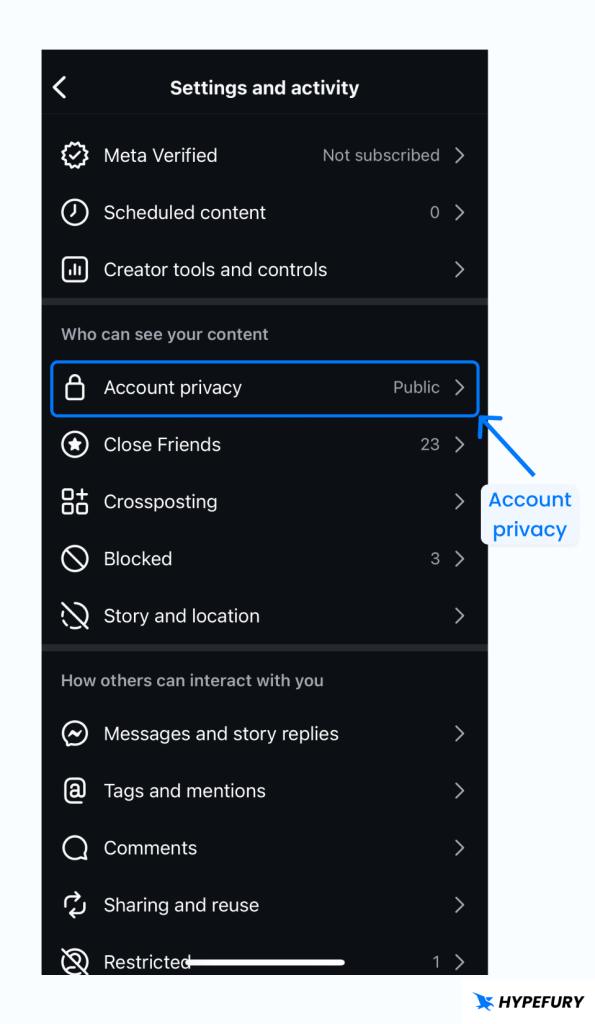
Account privacy

4. You will see the Private account toggle. Just toggle it and confirm to make your account private
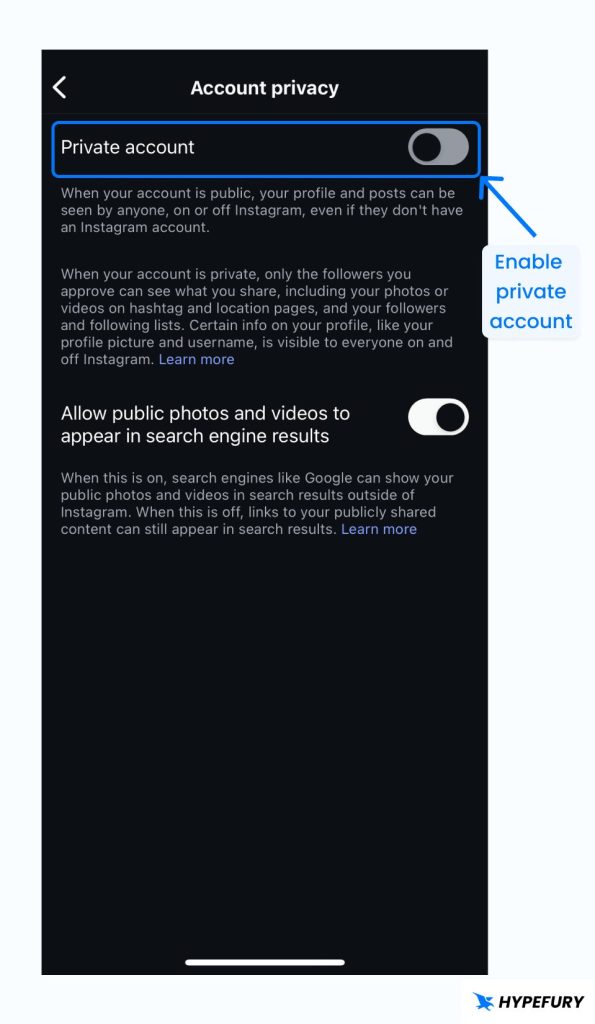
Instagram private account setting

Keep in mind, while your posts will only be seen by the accounts that you approve, this will also disable your posts from being shown in the feed and reels page and also being indexed by search engines. As a result, you will lose Instagram SEO benefits. 

If you’re a brand or building an audience, you should generally stay away from this option because it works against you.

Final Thoughts

Currently, Instagram does not notify users when their Stories, Posts or DMs are screenshotted.

But, remember that is is important to respect people’s privacy and ownership of their contents.

Ready to Grow Your Audience
& Make Money on Social?

Hypefury makes it easy to create, publish and monetize your content across social media 

Join 3,500+ creators who are using Hypefury to earn online

Grow your audience on social media with Hypefury

Works with

Hypefury makes it easy to grow on on social media by proving you with the features that make it easy to create, distribute and monetize your content

Join 3,500+ creators who are using Hypefury to earn online

Does Instagram Notify You When Someone Takes a Screenshot?

Does Instagram notify you when someone takes a screenshot

Does Instagram Notify When You Screenshot a Story?

No. Instagram does notify when you screenshot someone else’s story, nor does it notify you when someone screenshots your story.

Instagram used to have this feature a long time ago, where it would notify users when their stories were screenshot. However, that feature has long been gone, and Instagram no longer notifies about story screenshots.

That being said, there are some hacky ways that you can use to prevent people from screenshotting your stories, and it’s to prevent them from seeing them in the first place. We’ll take a look down below how to hide people from seeing your stories and posts.

Does Instagram Notify When You Screenshot a Post?

Just as with Instagram Stories, Instagram does not notify when someone screenshots a post.

Does Instagram Notify When You Screenshot a DM?

By default, Instagram does not notify when someone screenshots a DM, unless you’re using Instagram’s Vanish Mode – a feature that allows Instagram users to send each other DMs that disappear after they are read or after a certain time.

When using Vanish Mode, Instagram does notify when someone takes a screenshot or screen records. It’s a great tool for privacy protection if you want to discuss private, sensitive matters or gossip : ).

Instagram Vanish Mode

Why Do People Screenshot Instagram Stories, Posts or DMs?

People might screenshot stories, posts or DMs due to ethical or non-ethical reasons.

Here are some of the reasons why people save someone else’s contents;

  • Sharing information with friends outside Instagram.
  • Saving events that will happen and sharing them to other social media.
  • Keeping important announcements.

  • Saving a quote for later reference.
  • Getting ideas for future posts or projects.

How to Protect Your Stories and Posts from Screenshots

Protecting your stories or posts from not being seen by another user can be done through several ways, and among them are;

1. Use the Close Friends Feature

This allows you to share Stories only with selected people of your choice.

Making close friends is very easy and can be done with a few steps.

1. Visit your profile page.

2. Click the Settings button in the top right-hand side of your profile page, which is displayed as a hamburger icon (three lines).

Instagram profile settings button

3.  Scroll down, under ‘Who can see your content’, choose Close friends.

Instagram settings close friends

4. Select or search for the special friends you would like to be able to view your stories.

Instagram choose close friends

5. Once you’re done, just click Done.

2. Hide Your Stories from Specific Users

You can manually restrict who sees your Stories so that your Stories are only shown to the people you want.

Here is how you can hide your Instagram stories from specific users:

1. Visit your profile page

2. Click the Settings button in the top right-hand side of your profile page, which is displayed as a hamburger icon (three lines).

3. Scroll down until you see ‘Who can see your content’ and choose Story and location.

Story and Location Settings


4. Search and choose users you would like to hide your stories from.

Hide users from Instagram story

5. Click Done on the top right to confirm the users you wish to hide your stories from.

3. Make Your Account Private

By making your account private, only users you allow to follow you will be able to view your posts and stories.

Keep in mind that users who already follow you know will be able to see your posts and stories

Here is how you can make your Instagram account private:

1. Open Instagram and visit your profile page

2. Click the Settings button in the top right-hand side of your profile page, which is displayed as a hamburger icon (three lines).

3. Scroll down until you see ‘Who can see your content’, and choose Account privacy.

Account privacy

4. You will see the Private account toggle. Just toggle it and confirm to make your account private

Instagram private account setting

Keep in mind, while your posts will only be seen by the accounts that you approve, this will also disable your posts from being shown in the feed and reels page and also being indexed by search engines. As a result, you will lose Instagram SEO benefits. 

If you’re a brand or building an audience, you should generally stay away from this option because it works against you.
Final Thoughts

Currently, Instagram does not notify users when their Stories, Posts or DMs are screenshotted.

But, remember that is is important to respect people’s privacy and ownership of their contents.

Ready to Grow Your Audience
& Make Money on Social?

Hypefury makes it easy to create, publish

and monetize your content across social media 

Join 3,500+ creators who are using HypeFury to earn online

You might also like

We won’t send you spam. Unsubscribe at any time