Steal What’s Working on 𝕏 (Twitter) in 2025

10 high-performing frameworks for each niche which go viral every time! 

What are LinkedIn Impressions?

What are Impressions on LinkedIn

What is a LinkedIn Impression?

A LinkedIn impression is a count of how many times your content (post, carousel, article, or ad) has been displayed and viewed on someone’s screen or feed.

Every time your post, article, carousel, or comment is viewed by a LinkedIn member, regardless of whether they engaged with /interacted with it or not, it counts as an impression.

LinkedIn impressions are not counted based on unique views. So each new view by the same user counts as an impression and increases the impressions count.

This means that if a person views your post 10 times, it will increase your impressions by 10.

Impressions are counted when a person organically sees your content on their feed, through someone else’s repost, through a shared link, ads, or even if your post was shared through DMs

Impressions are equivalent to digital eyeballs on your LinkedIn posts.

Importance of LinkedIn Impressions

LinkedIn Impressions are a crucial metric for measuring your content’s visibility and how many people are seeing your content.

High impressions indicate that your content is being viewed/seen a lot.

This may also mean that LinkedIn is showing your post a lot on people’s feeds, or people are sharing your content a lot.

So it’s crucial to work on increasing your LinkedIn impressions.

How to View LinkedIn Post Impressions on The Analytics Page

Here is how you can view post impressions on the analytics page

1. Open your profile page by clicking on your profile image
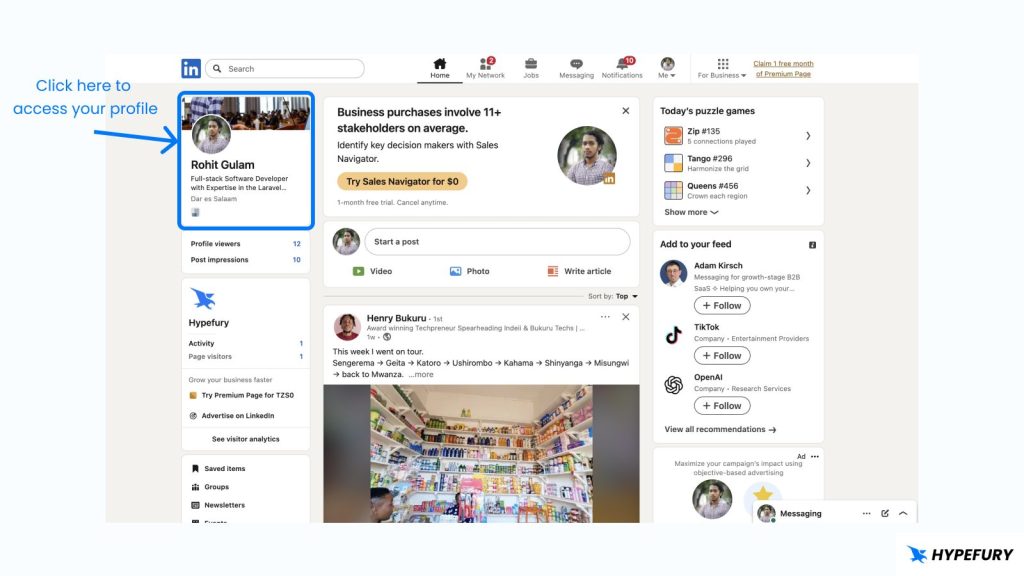
Access LinkedIn Profile

2. Under ‘Analytics’, click ‘Show all analytics’
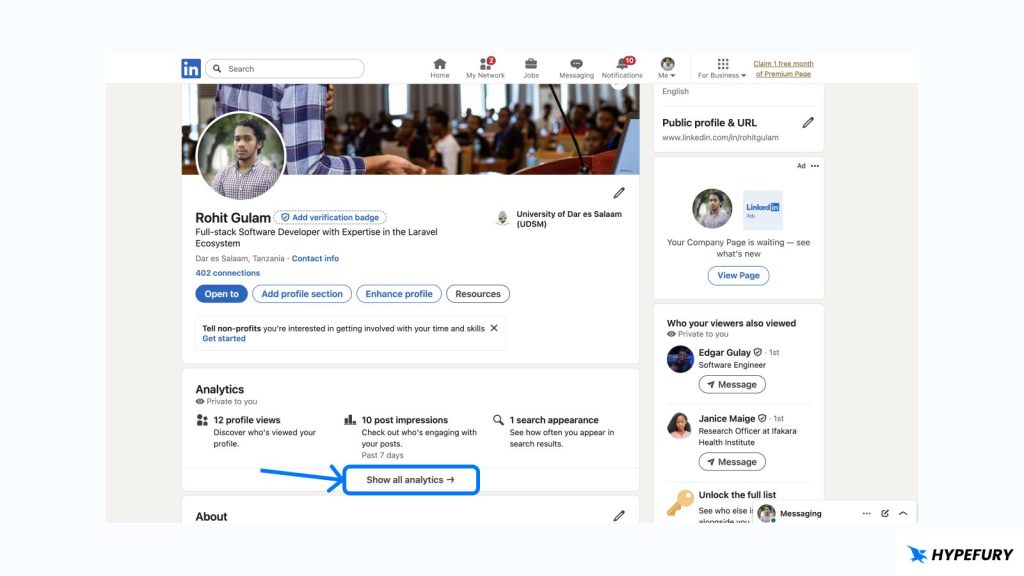
Access analytics page
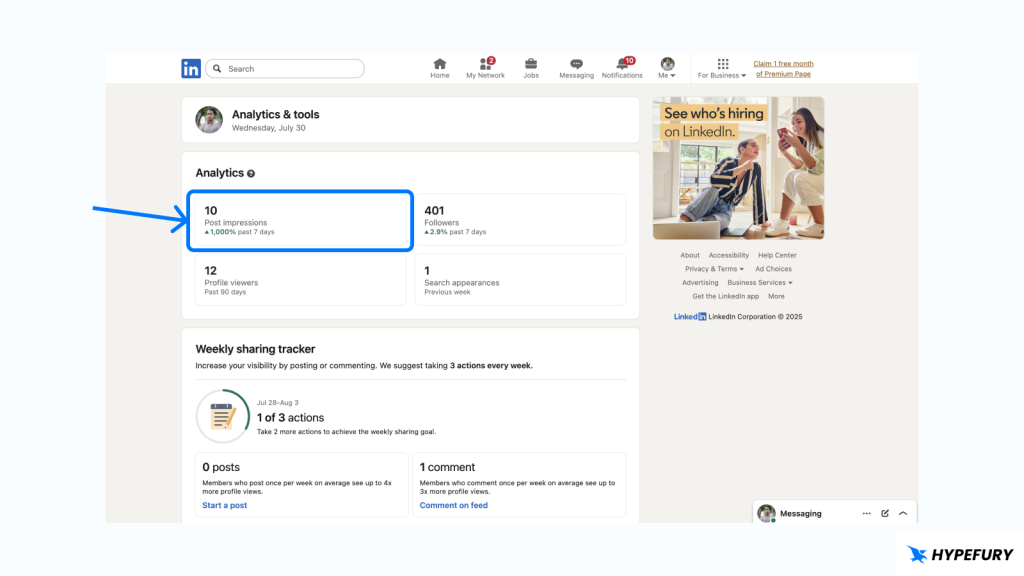
3. Click on ‘Post impressions’

Post impressions
4. Scroll down and you will see ‘Top performing posts’
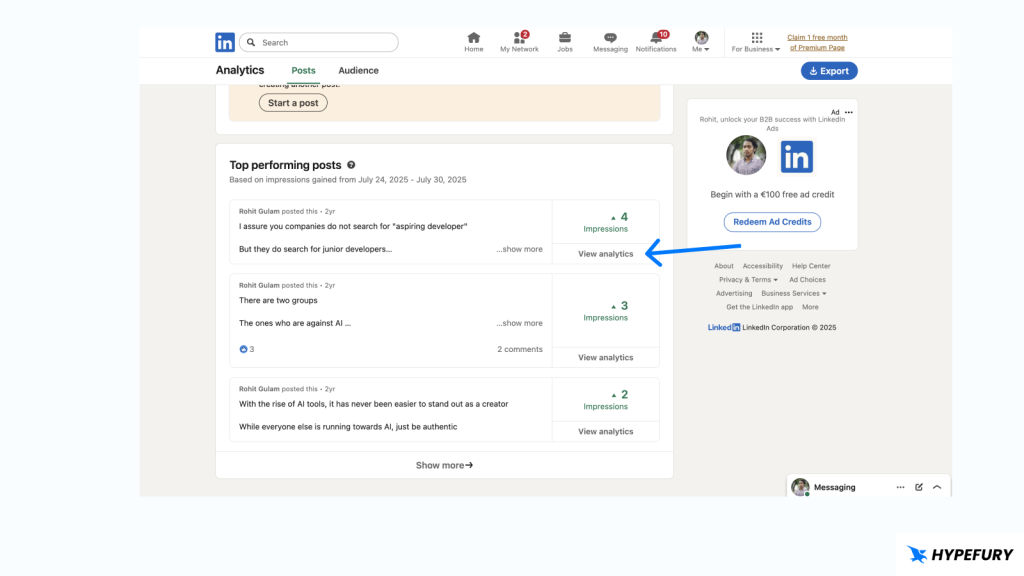
Top performing posts
5. Click on ‘View analytics’ on the post that you want to view its impressions
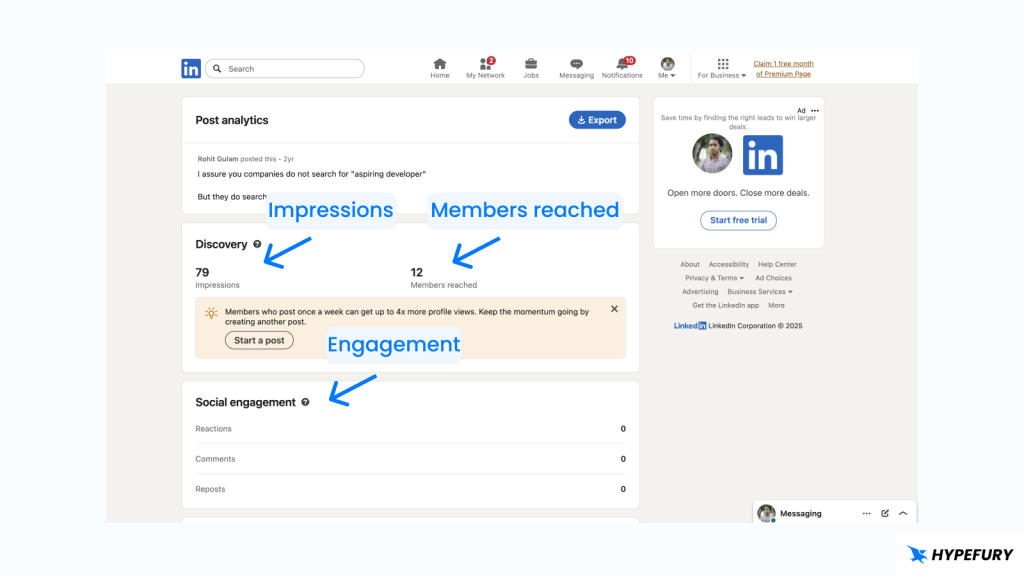
Single post analytics

You can change the timeframe on top because by default it shows the last 7 days

Impressions vs Members Reached (Reach)

Another crucial metric on LinkedIn is the Members Reached, also known as Reach.

While Impressions and Members Reached are sometimes used interchangeably, they are distinct metrics.

Members Reached refers to the unique number of LinkedIn members who viewed your content. Unlike Impressions, members are only counted once, regardless of how many times someone has seen your post.

So this number will always be less than impressions because every Member Reached counts as an impression, but not every impression counts as a member reached

Impressions refers to the number of times your post has been seen/viewed by someone on LinkedIn. If someone sees your post two times (one on feed and another time via DM if someone shared the post), then it will count as two impressions

To summarize, when a single person has seen your content 7 different times, you’ll probably have one reach and 7 impressions.

Impressions vs Social Engagements (Engagements)

Social Engagements refer to the interactions that your content receives from other LinkedIn members.

Other LinkedIn members can interact with your posts in different ways, such as:
– Reactions (likes)
– Comments
– Reposts/shares
– Click on your content to view more

6 Tips to Increase Your LinkedIn Impressions

1. Optimize your profile

You might think what has your profile got to do with your post impressions and the answer is everything.

On the feed, your posts are shown together with parts of your profile (your name and profile picture).

If your profile is not optimized or incomplete, for example low quality profile picture or if it’s completely missing, then chances are people will not engage with your posts and this will cause the algorithm to not show your posts more because people are not interested in you or your posts.

The easiest way to optimize your LinkedIn profile is to make sure that you reach 100% profile completion status and you use clear and professional profile picture and name.

2. Posting consistently

To build awareness, you must post, post, and post again; this makes people (and the algorithm) know that you are present.

But don’t just post for the sake of posting; post high-quality content.

It’s simply not possible for people and the algorithm to not notice you when you consistently post high-quality, repost-worthy content.

3. Engage with others

The quickest way to make others notice you is for you to make your presence known. And you do this by engaging with their posts (commenting and reacting).

When you comment or react to someone’s post, chances are they will see that in their notifications. And if your reply is high-quality and thought-provoking, they will want to know who are you and see more of your posts.

And they may even end up liking and commenting on your posts as well.

When they view your profile, it signals to the algorithm that they are interested in you. And when they engage, it completely seals the deal and the algorithm will start showing your posts to their feed.

4. Post LinkedIn carousels

Humans are visual creatures. We respond more to visuals than just words. This is why many people prefers movies to reading books.

The great thing about carousels is that you don’t need to design a lot and have many visual elements in them. You can have the same regular text that you would have in your normal LinkedIn post but just presented in slides.

At the bare minimum, you just have to ensure that the text is readable in terms of size and centered (not too far to the edges).

And you can automate this whole process with a tool like Hypefury that automatically generates LinkedIn carousels from your LinkedIn post (or tweets) then posts them to LinkedIn.

5. Use relevant hashtags

Different interest groups use different hashtags to categorize themselves and find each other’s posts.

When you use the correct hashtags, the hashtags that your niche uses, then there is a great chance that people will find your posts through those hashtags.

But you have to be careful with this to not over do it. Hashtags looks spammy by default. All that blue text is looks spammy. So a general rule is to use 3-5 hashtags max. Any more than that just looks spammy and people will just scroll right over your content.

6. Join the right LinkedIn groups

LinkedIn groups are communities for people with similar interests. Joining the right LinkedIn groups for your niche is a fantastic way for your posts to be discovered by other participants of the groups.

When you join a group don’t just join and be silent. Post content and participate in discussions so that people notice you and your content and eventually increase your impressions.

Final Thoughts

Impressions show how much attention you’ve gotten from people, so it’s time you considered making interesting content to get more impressions, because at the end of the day its about being visible and connecting with the right people.

Why Impressions?

Visibility

Impressions are what makes people know that your content has been seen by enough people.

Growth

When you have more impressions that also means you’ll be more likely to be the most clicked person, hence your account will grow more and more.

Performance

For maybe marketers, impressions can be a way for them to see how well some of the posts perform and how some of them do not, so they can choose what to post the most and what to not post.

Awareness

Impressions make people aware of what you’re doing or what you have, sometimes a business/brand can just be about making people aware first of it, then people will remember and later choose you.

Ready to Grow Your Audience
& Make Money on Social?

Hypefury makes it easy to create, publish and monetize your content across social media 

Join 3,500+ creators who are using Hypefury to earn online

Grow your audience on social media with Hypefury

Works with

Hypefury makes it easy to grow on on social media by proving you with the features that make it easy to create, distribute and monetize your content

Join 3,500+ creators who are using Hypefury to earn online

What are LinkedIn Impressions?

What are Impressions on LinkedIn

What is a LinkedIn Impression?

A LinkedIn impression is a count of how many times your content (post, carousel, article, or ad) has been displayed and viewed on someone’s screen or feed.

Every time your post, article, carousel, or comment is viewed by a LinkedIn member, regardless of whether they engaged with /interacted with it or not, it counts as an impression.

LinkedIn impressions are not counted based on unique views. So each new view by the same user counts as an impression and increases the impressions count.

This means that if a person views your post 10 times, it will increase your impressions by 10.

Impressions are counted when a person organically sees your content on their feed, through someone else’s repost, through a shared link, ads, or even if your post was shared through DMs

Impressions are equivalent to digital eyeballs on your LinkedIn posts.

Importance of LinkedIn Impressions

LinkedIn Impressions are a crucial metric for measuring your content’s visibility and how many people are seeing your content.

High impressions indicate that your content is being viewed/seen a lot.

This may also mean that LinkedIn is showing your post a lot on people’s feeds, or people are sharing your content a lot.

So it’s crucial to work on increasing your LinkedIn impressions.

How to View LinkedIn Post Impressions on The Analytics Page

Here is how you can view post impressions on the analytics page

1. Open your profile page by clicking on your profile image

Access LinkedIn Profile

2. Under ‘Analytics’, click ‘Show all analytics’

Access analytics page
3. Click on ‘Post impressions’

Post impressions
4. Scroll down and you will see ‘Top performing posts’

Top performing posts
5. Click on ‘View analytics’ on the post that you want to view its impressions

Single post analytics

You can change the timeframe on top because by default it shows the last 7 days

Impressions vs Members Reached (Reach)

Another crucial metric on LinkedIn is the Members Reached, also known as Reach.

While Impressions and Members Reached are sometimes used interchangeably, they are distinct metrics.

Members Reached refers to the unique number of LinkedIn members who viewed your content. Unlike Impressions, members are only counted once, regardless of how many times someone has seen your post.

So this number will always be less than impressions because every Member Reached counts as an impression, but not every impression counts as a member reached

Impressions refers to the number of times your post has been seen/viewed by someone on LinkedIn. If someone sees your post two times (one on feed and another time via DM if someone shared the post), then it will count as two impressions

To summarize, when a single person has seen your content 7 different times, you’ll probably have one reach and 7 impressions.

Impressions vs Social Engagements (Engagements)

Social Engagements refer to the interactions that your content receives from other LinkedIn members.

Other LinkedIn members can interact with your posts in different ways, such as:
– Reactions (likes)
– Comments
– Reposts/shares
– Click on your content to view more

6 Tips to Increase Your LinkedIn Impressions

1. Optimize your profile

You might think what has your profile got to do with your post impressions and the answer is everything.

On the feed, your posts are shown together with parts of your profile (your name and profile picture).

If your profile is not optimized or incomplete, for example low quality profile picture or if it’s completely missing, then chances are people will not engage with your posts and this will cause the algorithm to not show your posts more because people are not interested in you or your posts.

The easiest way to optimize your LinkedIn profile is to make sure that you reach 100% profile completion status and you use clear and professional profile picture and name.

2. Posting consistently

To build awareness, you must post, post, and post again; this makes people (and the algorithm) know that you are present.

But don’t just post for the sake of posting; post high-quality content.

It’s simply not possible for people and the algorithm to not notice you when you consistently post high-quality, repost-worthy content.

3. Engage with others

The quickest way to make others notice you is for you to make your presence known. And you do this by engaging with their posts (commenting and reacting).

When you comment or react to someone’s post, chances are they will see that in their notifications. And if your reply is high-quality and thought-provoking, they will want to know who are you and see more of your posts.

And they may even end up liking and commenting on your posts as well.

When they view your profile, it signals to the algorithm that they are interested in you. And when they engage, it completely seals the deal and the algorithm will start showing your posts to their feed.

4. Post LinkedIn carousels

Humans are visual creatures. We respond more to visuals than just words. This is why many people prefers movies to reading books.

The great thing about carousels is that you don’t need to design a lot and have many visual elements in them. You can have the same regular text that you would have in your normal LinkedIn post but just presented in slides.

At the bare minimum, you just have to ensure that the text is readable in terms of size and centered (not too far to the edges).

And you can automate this whole process with a tool like Hypefury that automatically generates LinkedIn carousels from your LinkedIn post (or tweets) then posts them to LinkedIn.

5. Use relevant hashtags

Different interest groups use different hashtags to categorize themselves and find each other’s posts.

When you use the correct hashtags, the hashtags that your niche uses, then there is a great chance that people will find your posts through those hashtags.

But you have to be careful with this to not over do it. Hashtags looks spammy by default. All that blue text is looks spammy. So a general rule is to use 3-5 hashtags max. Any more than that just looks spammy and people will just scroll right over your content.

6. Join the right LinkedIn groups

LinkedIn groups are communities for people with similar interests. Joining the right LinkedIn groups for your niche is a fantastic way for your posts to be discovered by other participants of the groups.

When you join a group don’t just join and be silent. Post content and participate in discussions so that people notice you and your content and eventually increase your impressions.

Final Thoughts

Impressions show how much attention you’ve gotten from people, so it’s time you considered making interesting content to get more impressions, because at the end of the day its about being visible and connecting with the right people.

Why Impressions?

Visibility

Impressions are what makes people know that your content has been seen by enough people.

Growth

When you have more impressions that also means you’ll be more likely to be the most clicked person, hence your account will grow more and more.

Performance

For maybe marketers, impressions can be a way for them to see how well some of the posts perform and how some of them do not, so they can choose what to post the most and what to not post.

Awareness

Impressions make people aware of what you’re doing or what you have, sometimes a business/brand can just be about making people aware first of it, then people will remember and later choose you.
Ready to Grow Your Audience
& Make Money on Social?

Hypefury makes it easy to create, publish

and monetize your content across social media 

Join 3,500+ creators who are using HypeFury to earn online

You might also like

We won’t send you spam. Unsubscribe at any time