Steal What’s Working on 𝕏 (Twitter) in 2025

10 high-performing frameworks for each niche which go viral every time! 

Instagram Notes: Everything You Need to Know About Instagram Notes and How to Use Them

Instagram Notes

Instagram is always introducing new features to keep users engaged and make communication easier.

One of the latest additions to the platform is Instagram Notes.

If you’re wondering what Instagram Notes are, how to use them, and why they matter, you’re in the right place!

This guide will walk you through everything you need to know about this feature and how to make the most of it.

What Are Instagram Notes?

Instagram Notes are short statuses (updates) that you can share with your followers or close friends. Instagram notes appear on top of the DM page, and they can be up to 60 characters long

Think of them as mini status text updates that you can share with many people at the same time appearing in the app’s Direct Messages (DMs) section.

Here is what you should know about Instagram Notes:

  • They are text-based posts limited to 60 characters.

  • They disappear after 24 hours, much like Instagram Stories.

  • Notes are not interactive like Stories, meaning followers can only reply via direct messages.

This feature is designed to encourage casual communication, similar to leaving a sticky note for someone.

How to Interact with Instagram Notes

  • Reply to a Note: Tap on someone’s note in the DMs section and type your reply. The response will go directly to their DMs.

  • Like a Note: Tap on their Note in the Notes tray and click the heart icon that appears in the messaging panel. You can even start a conversation by tapping the messenger icon next to their name after liking their Note.

  • View Data on Your Notes: While Instagram does not show a list of who viewed your Note, you can track interactions:

    • Likes: Tap your Note to see a list of people who liked it.

    • Replies: When someone replies to your Note, it will appear as a private conversation in your inbox.

How to Create an Instagram Note

Creating an Instagram Note is easy, here is how you can do it:

1. Open the Instagram app and go to your Direct Messages (DMs) by tapping the paper airplane icon in the top-right corner.

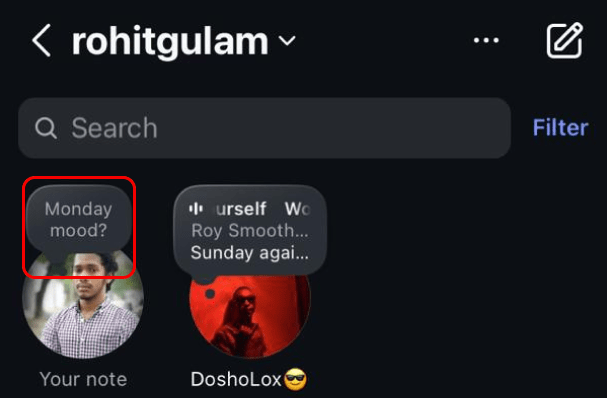
2. At the top of the DMs section, you’ll see a row labeled “Notes” with profile pictures of your friends who have posted notes.

3. Tap on your profile picture or the note bubble to write a note.
Create Instagram notes

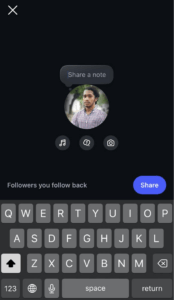
4. Type your message (up to 60 characters) in the text box. You can choose to write something, share a sound/song, or even a picture or video.
Create Instagram Notes

  1. Choose who can see your note:

    • Followers you follow back

    • Close Friends List

  2. Tap Share, and your note will appear at the top of the DMs section for the next 24 hours.

Using Instagram Notes on Posts and Reels (Content Notes)

Note: Content Notes feature has been removed by Instagram because not many people were using it. So as of now, it’s no longer available. 


View this post on Instagram


A post shared by Adam Mosseri (@mosseri)


Instagram recently added the ability to leave Notes related to posts and Reels.

So, why leave a Note instead of a comment? What’s the difference?

What Makes Notes on Posts and Reels Unique?

  • Notes only appear to your connections (people you follow who follow you back). If you leave a Note on someone’s post or Reel, only your connections will see it when they view that content.
  • Notes display automatically on a Reel or post. Your connections don’t need to click into the comments to see it.
  • The author of the post or Reel cannot see your Note unless they’re in your audience (i.e., someone you follow who follows you back).
  • Authors can disable Notes on their content, or if they’re in your audience, they can delete your Note.

In short: Notes on posts and Reels are like the in-between of a comment and a DM.

They’re less public than a comment but not as private as a DM.

How to Add a Note on a Post or Reel

1. Choose the post or Reel you want to leave a Note on.

2. Tap the Share icon (the paper airplane).
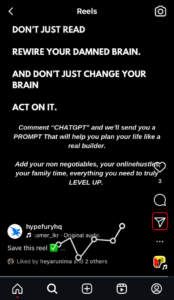
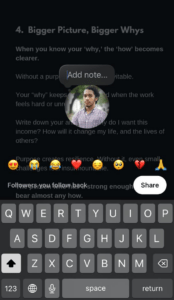
Add note to a reel

3. In the Share panel, tap Add Note (You might need to scroll if you don’t see it right away).
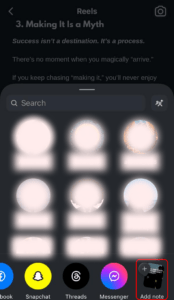
Share Instagram note on a reel

4. Write your Note.

Leave note on a reel

5. Select your audience (Followers you follow back or Close Friends).

6. Tap Share.

Your connections will now see your Note when they view the same post or Reel.

Why Use Instagram Notes?

Instagram Notes can benefit both personal and professional use.

Here are some reasons why you might want to use them:

1. Quick Communication

Notes are perfect for sharing quick thoughts, updates, or reminders without the need for a full-fledged post or Story.

2. Encourage Engagement

They’re a great way to start conversations. For example, you can leave a question or a poll idea to spark replies from your followers.

3. Personal Touch

Notes feel more personal and authentic, fostering better connections, choose your favorite song and share your taste to your friends ASAP!

4. Boost Visibility

By leaving a Note, you ensure your profile is one of the first things followers see when they check their DMs, increasing your visibility.

Best Practices for Instagram Notes

If you want to make the most out of Instagram Notes, here are some tips:

  • Keep it Short and Sweet: With only 60 characters, get straight to the point.

  • Use Emojis: Emojis can make your Notes stand out and add a fun element.

  • Ask Questions: Questions are a great way to encourage replies from your audience.

  • Be Authentic: Use Notes to share genuine thoughts or updates to build trust and engagement.

  • Stay Consistent: Posting Notes regularly can help you stay top-of-mind with your followers.

Creative Ideas for Instagram Notes

Not sure what to post as a Note? Here are some creative ideas:

  • Ask for Recommendations: “What’s a good movie to watch tonight?”

  • Share Fun Facts: “Did you know short people can’t reach the moon?”

  • Post Daily Affirmations: “You’ve got this today! ✨”

  • Announce Plans: “Heading to the gym, Who’s joining?”

  • Promote Content: “New post is live! Check it out 📲”

  • Funny Note: “If sarcasm was a sport, I’d have a gold medal.”

  • One-Word mood: “Vibin’.”

  • Motivational: “Small steps till you make it.”

  • Attitude: “Confidence is silent, insecurities are loud.”

  • Random Thought: “Does pineapple really belong to pizza? 🍍🍕”

  • Question of the Day: “Coffee or Tea?”

  • Relatable: “Me waiting for the weekend like 👀.”

  • Health/Fitness: “Sweat now, shine later.”

  • Friendly Reminder: “Don’t forget to breathe and drink some water💧.”

  • Aesthetic Vibes: “Find beauty in the little things.”

  • Sweet Note: “Your laughter is my favorite sound.”

  • Throwback: “Remember when we used to ?”

  • City Life: “Anyone tried the new café yet?”

  • Emojis Only: “✨😎🔥🌸🎶”

  • Seasonal: “The spice season is officially here 🎃.”

  • Morning Note: “Good morning, legends ☀️.”

  • Night Note: “Don’t forget to dream big 🌙.”

  • Love Vibe: “You make the world brighter just by being in it ❤️.”

Instagram Notes Idea Category

Here are a few categories of Instagram notes ideas you can use;

Cool Instagram Notes Ideas

  • “Vibes over everything ✌🏽”

  • “Energy speaks louder than words.”

  • “Chasing sunsets, not people!”

  • “Stay real, stay cool.”

  • “Cold heart, warm coffee ☕❄️”

  • “Doing me, for me.”

  • “Less talking, more doing.”

  • “Unbothered, always.”

  • “Building my empire brick by brick.”

  • “Eyes on the stars, feet on the ground.”

  • “Forever outside the box 🕶️”

  • “Cooler than your playlist.”

Funny Instagram Notes Ideas

  • “My bed is calling and I must go 🛏️”

  • “Serving looks, not lunch.”

  • “Mentally at the beach, physically at work.”

  • “Who needs abs when you’ve got snacks?”

  • “My patience is currently buffering…”

  • “I’m on a seafood diet. I see food and I eat it.”

  • “Stop sending me reels at 3am 😭”

  • “Password is… just kidding.”

  • “Today’s goal: survive.”

  • “Why fall in love when you can fall asleep?”

Instagram Notes Ideas for Boys

  • “Stack now, flex later 💸”

  • “Gym > Party.”

  • “Catch flights, not feelings.”

  • “Work hard, stay humble.”

  • “King mindset 👑”

  • “New week, same hustle.”

  • “Not lucky, just grinding.”

  • “Lowkey but legendary.”

Instagram Notes Ideas for Girls

  • “Messy bun, getting things done ✨”

  • “Caffeine & confidence ☕💅”

  • “Too glam to give a damn.”

  • “Yes to plans, no to stress.”

  • “Queen energy only 👑”

  • “Good vibes only 🌸”

  • “Shoes speak louder than words 👠”

  • “Soft heart, strong mind.”

  • “Currently manifesting my best life ✨”

  • “Shopping is cardio.”

  • “Not your average girl 💖”

  • “Self-love is the best love.”

Business Instagram Notes Ideas

  • “New product dropping soon 🚀”

  • “DM us for collabs 📩”

  • “Quality > Quantity, always.”

  • “Here to serve, not sell.”

  • “Work hard, brand harder.”

  • “Consistency wins.”

  • “What’s your favorite from our collection?”

  • “Grind today, shine tomorrow.”

  • “Building trust one step at a time.”

  • “Your feedback matters ❤️”

  • “Innovation never sleeps.”

  • “Turning ideas into impact.”

  • “This week’s deal won’t last ⏳”

Short Instagram Notes Ideas

  • “On my way.”

  • “Stay tuned.”

  • “Good vibes.”

  • “Why not?”

  • “Loading…”

  • “Blessed.”

  • “Grateful.”

  • “Chillin’.”

  • “Outside.”

  • “Busy.”

  • “Done.”

  • “Next.”

  • “Focus.”

One Word Instagram Notes Ideas

  • “Vibes.”

  • “Unstoppable.”

  • “Fearless.”

  • “Legend.”

  • “Energy.”

  • “Savage.”

  • “Dreaming.”

  • “Grateful.”

  • “Peace.”

  • “Chasing.”

  • “Faith.”

  • “Winning.”

  • “Focused.”

  • “Limitless.”

  • “Mood.”

Lorem ipsum dolor sit amet, consectetur adipiscing elit. Ut elit tellus, luctus nec ullamcorper mattis, pulvinar dapibus leo.

Diwali Instagram Notes

  • Sweets > Stress
  • Sparkle Season on
  • Too lit to handle
  • Let there be light 
  • Let there be roshni
  • Lit but broke
  • You light up my Diwali
  • Good light and calm vibes
  • Glowing together this Diwali
  • Building brighter futures

FAQs About Instagram Notes

How do I turn on Instagram Notes?

Instagram Notes were automatically enabled for all users when the feature was released. 

If you can’t see them on your account, then you may need to check if you have the latest version of the app and update if you don’t have the latest version.

Are Instagram Notes seen by everyone?  

No, unlike regular posts, Instagram Notes are not seen by everyone. They can only be seen by followers you follow back or close friends, and when posting a Note, you have an option on which group you want to see your Note.

Can people see who viewed their Instagram Notes?

You can’t see who has viewed your Note because it is automatically displayed in the message view, and it doesn’t require anyone to click it to view it.

How do I know who viewed my Instagram Note?

There isn’t a way to know who viewed your Note, but you can tell if someone liked it or replied to it.

Can you hide people’s notes on Instagram?

Yes, you can hide other people’s Notes by muting their Notes. You can do this in two ways. One way is by tapping and holding a Note from an account you want to mute, then choose “Mute notes”. Another way to mute someone’s Notes is to go to their profile, tap followings, then tap on mute. Then choose to mute Notes.

How do I like someone’s Instagram Note?

To like a Note, tap on the Note. Then, once it opens, tap on the heart icon to like it.

Can I see who liked my Instagram Note?

Yes you can see who liked your Instagram Note. To check who like your Instagram Note, tap on it. Then you will see all the people who liked your Note as well as who replied to your Note

Ready to Grow Your Audience
& Make Money on Social?

Hypefury makes it easy to create, publish and monetize your content across social media 

Join 3,500+ creators who are using Hypefury to earn online

Grow your audience on social media with Hypefury

Works with

Hypefury makes it easy to grow on on social media by proving you with the features that make it easy to create, distribute and monetize your content

Join 3,500+ creators who are using Hypefury to earn online

Instagram Notes: Everything You Need to Know About Instagram Notes and How to Use Them

Instagram Notes

Instagram is always introducing new features to keep users engaged and make communication easier.

One of the latest additions to the platform is Instagram Notes.

If you’re wondering what Instagram Notes are, how to use them, and why they matter, you’re in the right place!

This guide will walk you through everything you need to know about this feature and how to make the most of it.

What Are Instagram Notes?

Instagram Notes are short statuses (updates) that you can share with your followers or close friends. Instagram notes appear on top of the DM page, and they can be up to 60 characters long

Think of them as mini status text updates that you can share with many people at the same time appearing in the app’s Direct Messages (DMs) section.

Here is what you should know about Instagram Notes:

  • They are text-based posts limited to 60 characters.

  • They disappear after 24 hours, much like Instagram Stories.

  • Notes are not interactive like Stories, meaning followers can only reply via direct messages.

This feature is designed to encourage casual communication, similar to leaving a sticky note for someone.

How to Interact with Instagram Notes

  • Reply to a Note: Tap on someone’s note in the DMs section and type your reply. The response will go directly to their DMs.

  • Like a Note: Tap on their Note in the Notes tray and click the heart icon that appears in the messaging panel. You can even start a conversation by tapping the messenger icon next to their name after liking their Note.

  • View Data on Your Notes: While Instagram does not show a list of who viewed your Note, you can track interactions:

    • Likes: Tap your Note to see a list of people who liked it.

    • Replies: When someone replies to your Note, it will appear as a private conversation in your inbox.

How to Create an Instagram Note

Creating an Instagram Note is easy, here is how you can do it:

1. Open the Instagram app and go to your Direct Messages (DMs) by tapping the paper airplane icon in the top-right corner.

2. At the top of the DMs section, you’ll see a row labeled “Notes” with profile pictures of your friends who have posted notes.

3. Tap on your profile picture or the note bubble to write a note.

Create Instagram notes

4. Type your message (up to 60 characters) in the text box. You can choose to write something, share a sound/song, or even a picture or video.

Create Instagram Notes

  1. Choose who can see your note:

    • Followers you follow back

    • Close Friends List

  2. Tap Share, and your note will appear at the top of the DMs section for the next 24 hours.

Using Instagram Notes on Posts and Reels (Content Notes)

Note: Content Notes feature has been removed by Instagram because not many people were using it. So as of now, it’s no longer available. 


View this post on Instagram


A post shared by Adam Mosseri (@mosseri)


Instagram recently added the ability to leave Notes related to posts and Reels.

So, why leave a Note instead of a comment? What’s the difference?

What Makes Notes on Posts and Reels Unique?

  • Notes only appear to your connections (people you follow who follow you back). If you leave a Note on someone’s post or Reel, only your connections will see it when they view that content.
  • Notes display automatically on a Reel or post. Your connections don’t need to click into the comments to see it.
  • The author of the post or Reel cannot see your Note unless they’re in your audience (i.e., someone you follow who follows you back).
  • Authors can disable Notes on their content, or if they’re in your audience, they can delete your Note.

In short: Notes on posts and Reels are like the in-between of a comment and a DM.

They’re less public than a comment but not as private as a DM.

How to Add a Note on a Post or Reel

1. Choose the post or Reel you want to leave a Note on.

2. Tap the Share icon (the paper airplane).

Add note to a reel

3. In the Share panel, tap Add Note (You might need to scroll if you don’t see it right away).

Share Instagram note on a reel

4. Write your Note.

Leave note on a reel

5. Select your audience (Followers you follow back or Close Friends).

6. Tap Share.

Your connections will now see your Note when they view the same post or Reel.

Why Use Instagram Notes?

Instagram Notes can benefit both personal and professional use.

Here are some reasons why you might want to use them:

1. Quick Communication

Notes are perfect for sharing quick thoughts, updates, or reminders without the need for a full-fledged post or Story.

2. Encourage Engagement

They’re a great way to start conversations. For example, you can leave a question or a poll idea to spark replies from your followers.

3. Personal Touch

Notes feel more personal and authentic, fostering better connections, choose your favorite song and share your taste to your friends ASAP!

4. Boost Visibility

By leaving a Note, you ensure your profile is one of the first things followers see when they check their DMs, increasing your visibility.

Best Practices for Instagram Notes

If you want to make the most out of Instagram Notes, here are some tips:

  • Keep it Short and Sweet: With only 60 characters, get straight to the point.

  • Use Emojis: Emojis can make your Notes stand out and add a fun element.

  • Ask Questions: Questions are a great way to encourage replies from your audience.

  • Be Authentic: Use Notes to share genuine thoughts or updates to build trust and engagement.

  • Stay Consistent: Posting Notes regularly can help you stay top-of-mind with your followers.

Creative Ideas for Instagram Notes

Not sure what to post as a Note? Here are some creative ideas:

  • Ask for Recommendations: “What’s a good movie to watch tonight?”

  • Share Fun Facts: “Did you know short people can’t reach the moon?”

  • Post Daily Affirmations: “You’ve got this today! ✨”

  • Announce Plans: “Heading to the gym, Who’s joining?”

  • Promote Content: “New post is live! Check it out 📲”

  • Funny Note: “If sarcasm was a sport, I’d have a gold medal.”

  • One-Word mood: “Vibin’.”

  • Motivational: “Small steps till you make it.”

  • Attitude: “Confidence is silent, insecurities are loud.”

  • Random Thought: “Does pineapple really belong to pizza? 🍍🍕”

  • Question of the Day: “Coffee or Tea?”

  • Relatable: “Me waiting for the weekend like 👀.”

  • Health/Fitness: “Sweat now, shine later.”

  • Friendly Reminder: “Don’t forget to breathe and drink some water💧.”

  • Aesthetic Vibes: “Find beauty in the little things.”

  • Sweet Note: “Your laughter is my favorite sound.”

  • Throwback: “Remember when we used to ?”

  • City Life: “Anyone tried the new café yet?”

  • Emojis Only: “✨😎🔥🌸🎶”

  • Seasonal: “The spice season is officially here 🎃.”

  • Morning Note: “Good morning, legends ☀️.”

  • Night Note: “Don’t forget to dream big 🌙.”

  • Love Vibe: “You make the world brighter just by being in it ❤️.”

Instagram Notes Idea Category

Here are a few categories of Instagram notes ideas you can use;

Cool Instagram Notes Ideas

  • “Vibes over everything ✌🏽”

  • “Energy speaks louder than words.”

  • “Chasing sunsets, not people!”

  • “Stay real, stay cool.”

  • “Cold heart, warm coffee ☕❄️”

  • “Doing me, for me.”

  • “Less talking, more doing.”

  • “Unbothered, always.”

  • “Building my empire brick by brick.”

  • “Eyes on the stars, feet on the ground.”

  • “Forever outside the box 🕶️”

  • “Cooler than your playlist.”

Funny Instagram Notes Ideas

  • “My bed is calling and I must go 🛏️”

  • “Serving looks, not lunch.”

  • “Mentally at the beach, physically at work.”

  • “Who needs abs when you’ve got snacks?”

  • “My patience is currently buffering…”

  • “I’m on a seafood diet. I see food and I eat it.”

  • “Stop sending me reels at 3am 😭”

  • “Password is… just kidding.”

  • “Today’s goal: survive.”

  • “Why fall in love when you can fall asleep?”

Instagram Notes Ideas for Boys

  • “Stack now, flex later 💸”

  • “Gym > Party.”

  • “Catch flights, not feelings.”

  • “Work hard, stay humble.”

  • “King mindset 👑”

  • “New week, same hustle.”

  • “Not lucky, just grinding.”

  • “Lowkey but legendary.”

Instagram Notes Ideas for Girls

  • “Messy bun, getting things done ✨”

  • “Caffeine & confidence ☕💅”

  • “Too glam to give a damn.”

  • “Yes to plans, no to stress.”

  • “Queen energy only 👑”

  • “Good vibes only 🌸”

  • “Shoes speak louder than words 👠”

  • “Soft heart, strong mind.”

  • “Currently manifesting my best life ✨”

  • “Shopping is cardio.”

  • “Not your average girl 💖”

  • “Self-love is the best love.”

Business Instagram Notes Ideas

  • “New product dropping soon 🚀”

  • “DM us for collabs 📩”

  • “Quality > Quantity, always.”

  • “Here to serve, not sell.”

  • “Work hard, brand harder.”

  • “Consistency wins.”

  • “What’s your favorite from our collection?”

  • “Grind today, shine tomorrow.”

  • “Building trust one step at a time.”

  • “Your feedback matters ❤️”

  • “Innovation never sleeps.”

  • “Turning ideas into impact.”

  • “This week’s deal won’t last ⏳”

Short Instagram Notes Ideas

  • “On my way.”

  • “Stay tuned.”

  • “Good vibes.”

  • “Why not?”

  • “Loading…”

  • “Blessed.”

  • “Grateful.”

  • “Chillin’.”

  • “Outside.”

  • “Busy.”

  • “Done.”

  • “Next.”

  • “Focus.”

One Word Instagram Notes Ideas

  • “Vibes.”

  • “Unstoppable.”

  • “Fearless.”

  • “Legend.”

  • “Energy.”

  • “Savage.”

  • “Dreaming.”

  • “Grateful.”

  • “Peace.”

  • “Chasing.”

  • “Faith.”

  • “Winning.”

  • “Focused.”

  • “Limitless.”

  • “Mood.”

Lorem ipsum dolor sit amet, consectetur adipiscing elit. Ut elit tellus, luctus nec ullamcorper mattis, pulvinar dapibus leo.

Diwali Instagram Notes

  • Sweets > Stress
  • Sparkle Season on
  • Too lit to handle
  • Let there be light 
  • Let there be roshni
  • Lit but broke
  • You light up my Diwali
  • Good light and calm vibes
  • Glowing together this Diwali
  • Building brighter futures

FAQs About Instagram Notes

How do I turn on Instagram Notes?

Instagram Notes were automatically enabled for all users when the feature was released. 

If you can’t see them on your account, then you may need to check if you have the latest version of the app and update if you don’t have the latest version.

Are Instagram Notes seen by everyone?  

No, unlike regular posts, Instagram Notes are not seen by everyone. They can only be seen by followers you follow back or close friends, and when posting a Note, you have an option on which group you want to see your Note.

Can people see who viewed their Instagram Notes?

You can’t see who has viewed your Note because it is automatically displayed in the message view, and it doesn’t require anyone to click it to view it.

How do I know who viewed my Instagram Note?

There isn’t a way to know who viewed your Note, but you can tell if someone liked it or replied to it.

Can you hide people’s notes on Instagram?

Yes, you can hide other people’s Notes by muting their Notes. You can do this in two ways. One way is by tapping and holding a Note from an account you want to mute, then choose “Mute notes”. Another way to mute someone’s Notes is to go to their profile, tap followings, then tap on mute. Then choose to mute Notes.

How do I like someone’s Instagram Note?

To like a Note, tap on the Note. Then, once it opens, tap on the heart icon to like it.

Can I see who liked my Instagram Note?

Yes you can see who liked your Instagram Note. To check who like your Instagram Note, tap on it. Then you will see all the people who liked your Note as well as who replied to your Note

Ready to Grow Your Audience
& Make Money on Social?

Hypefury makes it easy to create, publish

and monetize your content across social media 

Join 3,500+ creators who are using HypeFury to earn online

You might also like

We won’t send you spam. Unsubscribe at any time